The remote your Mac never had.
Cue turns your iPhone — and your wrist — into a real remote for everything playing on your Mac: Netflix, YouTube Music, Prime, VLC, QuickTime, any browser tab. Real posters, real titles, over your own Wi-Fi.
macOS 14+. Free and open source. The iPhone and Watch apps are built and installed with Xcode — see the guide.






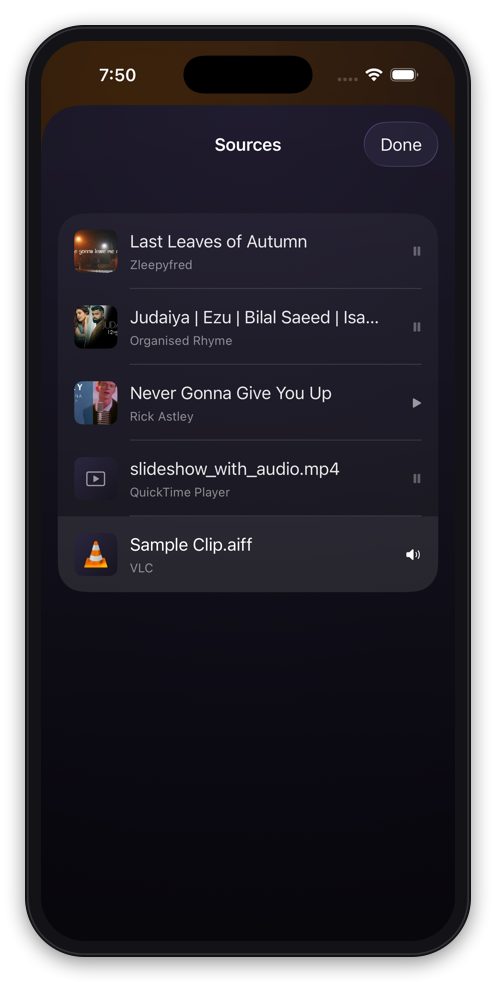
Everything open. One tap away.
macOS only admits to one now-playing app at a time. Cue sees them all — every Chrome tab holding media, every QuickTime window, whatever VLC has loaded — playing or paused, with real thumbnails.
- ✓Paused tabs included — the ones macOS forgets about entirely
- ✓Tap to switch: Cue pauses the rest, raises the window, presses play
- ✓Ad iframes filtered out, so the list is only real media
It knows what show you’re watching.
Netflix tells your Mac its name is “Netflix” and hands over no artwork at all. Cue reads the actual title off the player, remembers it when the controls fade, and finds the real poster — shown at its native 2:3, never cropped.
Netflix from the couch. Actually fullscreen.
No extension can fullscreen a browser video — Chrome only trusts a real keypress. So Cue makes one.
One key covers YouTube, Netflix, Prime and Hotstar. QuickTime and VLC go fullscreen natively — and VLC is deliberately left alone on audio-only items, so it never surprises you on the next video.
Now on your wrist.
A deliberately small watch app: what’s playing, play/pause, ±15s — and the Digital Crown turns your Mac’s volume, with haptic ticks. It relays through your iPhone, so there is nothing new to pair.
- ✓Digital Crown is a volume knob for your Mac
- ✓Real artwork, resized to what a watch can actually resolve
- ✓Progress ticks locally — a playing track costs zero transfers
No queue, no source picker — on a watch, those are worse than reaching for your phone. So they aren’t there.
Small things, done properly.
Up Next, browsable
YouTube Music and YouTube playlists with artwork, artists and durations — verified at 207 rows. VLC’s playlist rides the same rails.
On your Lock Screen
A Live Activity with working buttons and a progress bar that keeps ticking — no push service, no paid developer account. Dynamic Island included.
Real volume buttons
Press the iPhone’s physical volume keys and the Mac’s volume moves — through CoreAudio directly, because the AppleScript route lagged 200 ms per call.
+15 means +15
macOS’s idea of playback position can drift 15 seconds on Netflix. Cue reads the video element’s real clock, ages it forward, and seeks to the exact second.
Like from the couch
Thumbs up and down on YouTube Music, reflecting the page’s real state — filled when it’s liked, hollow when it isn’t.
A quiet menu bar app
Cue Booth lives in the menu bar: live now-playing, transport, launch-at-login — and a pairing code masked by default, because that window ends up in screen shares.
No cloud. No account.
No server to trust.
Cue is two apps on your own two machines. They find each other with Bonjour, speak over a WebSocket on your Wi-Fi, and prove themselves with a six-digit code — once. Nothing leaves the house, because there is nowhere for it to go.
Three steps. The last one is a formality.
Needs macOS 14+, iOS 17+, and both machines on the same Wi-Fi. Browser control is Chrome, via the bundled extension. Wear an Apple Watch? The watch app rides along automatically — it talks through your iPhone.
Details that survived measurement.
Most of Cue is invisible plumbing. These are the numbers it is built around.
how far a “+15s” skip actually moved Netflix when trusting macOS's drifting position. Cue reads the video's own clock instead.
the state-broadcast throttle. Full snapshots every time, never diffs — the phone cannot drift out of sync.
the artwork squeezed into a Live Activity's ~4 KB payload budget, compressed adaptively until it fits.
how far into a file QuickTime thumbnails are taken, so a fade-from-black never yields a black frame.
the artwork relayed to the watch — more than a 45 mm screen resolves, small enough for the payload budget.
how much one press of the iPhone's volume buttons nudges the Mac — the phone re-centers itself so presses never stop registering.
the trusted f keystroke that fullscreens YouTube, Netflix, Prime and Hotstar alike.
accounts, servers, analytics, and cloud round-trips per tap.
Two ways to get it.
Clone the repo, run one script for the Mac app, build the iPhone app in Xcode. About five minutes, MIT licensed, and a free Apple ID is enough.
- ✓The whole source, forever
- ✓No Apple developer account needed
- ✓Fixes and features land in the open
A signed, ready-made build of both apps — no Xcode, no seven-day re-signs, updates included. One-time purchase; the price is still settling.
- ✓Install and go — no build step
- ✓Properly signed and notarized
- ✓Same app, same local-only promise